
Qibla Finder | IbadahApp
Your qibla position three ways: a compass, a line on the map, and the bearing in degrees.


Find Qibla Direction from Mecca
Map Tool to Find the Qibla
Prayer Time in Mecca


What the Qibla Is: The Kaaba Direction and Why Prayer Faces Makkah
The Qibla is the direction a Muslim faces in prayer: toward the Kaaba in Makkah. It was not always so. For the first years in Madinah, prayer faced Jerusalem; the verse at the foot of this page changed it. Madinah's Masjid al-Qiblatayn, the Mosque of the Two Qiblas, is named for that change.
3 Steps to Qibla Direction from My Location
Step 1: Allow Location or Search Your City
Allow location and IbadahApp works out the direction from your coordinates. If you would rather not, type your city into the search box.
Step 2: Lay the Phone Flat
Hold the phone flat, screen up and level with the ground. A tilted phone makes the needle wander.
Step 3: Turn Until It Lines Up
Turn your whole body slowly until the arrow settles on the Qibla. IbadahApp tells you when you are there, so you never have to read the angle yourself.
Reading the Angle and the Distance
IbadahApp shows two numbers under the compass. The angle, 324.89°, is a bearing measured clockwise from true north: 0° is north, 90° east, 180° south, 270° west. The distance, 0.00 km, is how far the Kaaba is from you across the earth's surface.
Both figures IbadahApp shows come from the great-circle bearing between your coordinates and the Kaaba, which is the shortest path over a sphere rather than a straight line drawn on a flat map.
Qibla Direction Online When the Compass Does Not Move
The compass needs a sensor in the device and permission to use it. Whenever it will not turn, IbadahApp’s map and angle in degrees still work. Four common reasons it sits still:
- On a desktop or laptop: most have no compass sensor, so the arrow cannot turn.
- Near metal or magnets: laptops, speakers, magnetic phone cases and car dashboards all pull the needle. Step away and try again.
- On iPhone: Safari asks separately for motion and orientation access. Reload the page and allow it when prompted.
- Location not allowed: with no coordinates there is nothing to point at. Search your city instead.
Why Use IbadahApp to Find Your Qibla
Free, No Ads
IbadahApp gives you the direction in the minute or two before you pray. No interstitial ad in the way and no sign-up prompt first, just the direction.
Qibla Finder Online, No App Needed
A hotel room, someone else's house, a borrowed phone: finding the Qibla once is not worth installing an app for. Open IbadahApp and it works.
Qibla Direction Compass Online, Map and Degrees
IbadahApp gives three forms of the same answer. If the compass will not turn, the map and the angle carry on working.
Distance to Makkah
Next to the direction, IbadahApp shows how far the Kaaba is from where you are standing.
It Tells You When You Are Lined Up
You do not have to read the angle and judge it yourself. Turn until IbadahApp says you are facing Makkah.
Qibla Direction Live When the Page Loads
No sign-up and no setup. IbadahApp shows the direction on screen as soon as the page opens.
IbadahApp: Your Daily Ibadah Tools for Prayer Times and Qibla
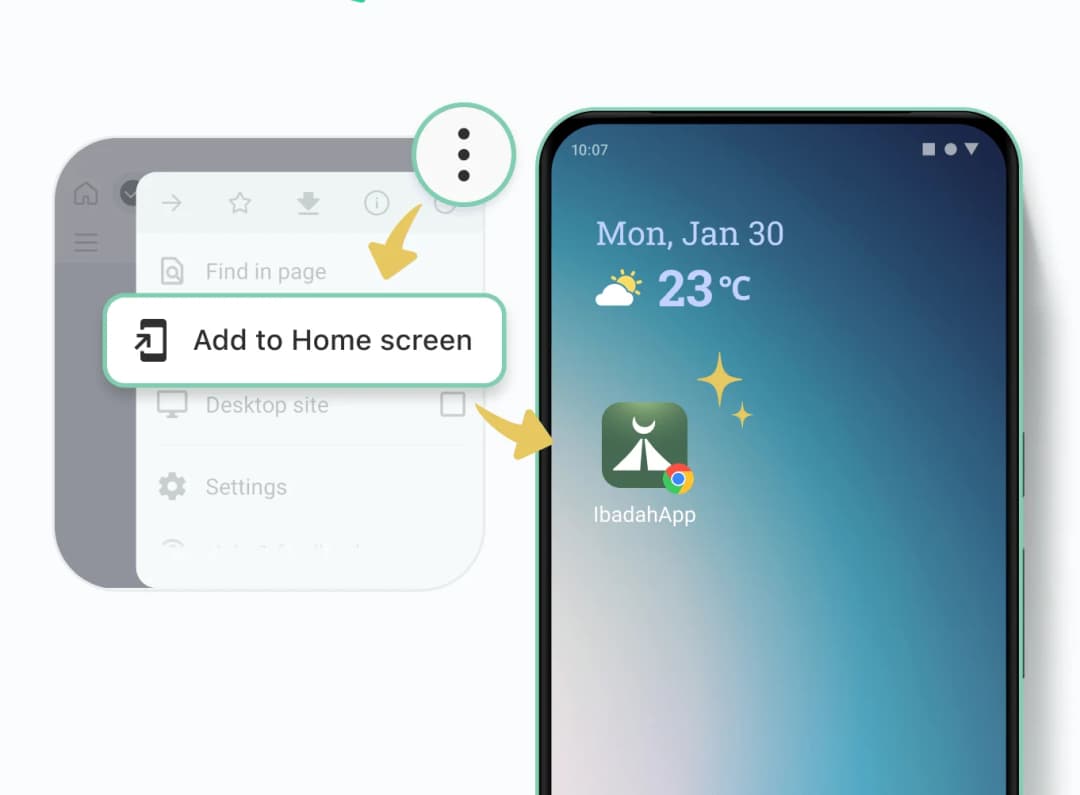
Why add it: One tap on your home screen opens today's prayer times and Qibla direction. No typing the address, no hunting for the tab.
How to add it: Open your browser menu and choose Add to Home Screen. The icon appears with your other apps.
Note: This adds a shortcut, not an app. Nothing is downloaded and no storage is used.
Finding the Qibla Without a Compass
If IbadahApp's compass is not available, there are other ways to face the right direction. They differ in what they need and when they work.
The Map
Open IbadahApp’s map and read the line running from your position to the Kaaba. It works day or night, indoors or out, and needs only your location.
The Sun
By day the sun fixes your bearings well enough. Read the angle from IbadahApp, work out where north is from the sun, then turn to that angle.
The North Star
At night in the northern hemisphere, Polaris sits over true north. Once you know where north is, turn to the Qibla angle IbadahApp gives from there.
Doing Your Best
With no way to check, you judge as best you can and pray. This is discussed under tahharri, citing Qur'an 2:115: “So wherever you turn, there is the Face of Allah.” Whether it must be repeated differs between the schools, so ask locally.
Making Sure the Qibla Position Is Right
If you would like to feel more settled about it, there are two easy checks. Open the map and see whether the line runs the way you are facing. Or compare with a mosque you already pray in: stand as you would there, and see whether the two agree.
Old mosques sometimes face a little differently from what a calculation gives. Many were laid out by the sun, the stars, or an older mosque nearby, and small differences carried forward through rebuilding. For congregation, follow the mosque you are in.
Frequently Asked Questions
How is this different from searching on Google?

IbadahApp gives you the direction three ways at once: a compass that turns with you, a line on a map, and the angle in degrees. It also shows the distance to the Kaaba, and it works without an account or an install.
Can I use it without allowing location?
Yes. Search for your city instead and IbadahApp works out the direction from there. The map works the same way.
Do I need an internet connection?
Yes. IbadahApp has to load and the direction is worked out when you ask for it, so it does not work offline.
How should I hold the phone?
Flat, screen up, level with the ground, and away from metal and magnets. Turn your whole body rather than twisting the phone in your hand.
فَوَلِّ وَجْهَكَ شَطْرَ الْمَسْجِدِ الْحَرَامِ ۚ وَحَيْثُ مَا كُنتُمْ فَوَلُّوا وُجُوهَكُمْ شَطْرَهُ
"So turn your face toward al-Masjid al-Haram. And wherever you are, turn your faces toward it."
Qur'an 2:144 (Sahih International)